
It could be simple.
We could have — come on — two standardized cables that would cover all possible uses in the studio.
They would be different colors…
We would immediately know when to use one or when to use the other…
The connectors would be the same…
Unfortunately, and you have probably already realized: it doesn’t work like that.
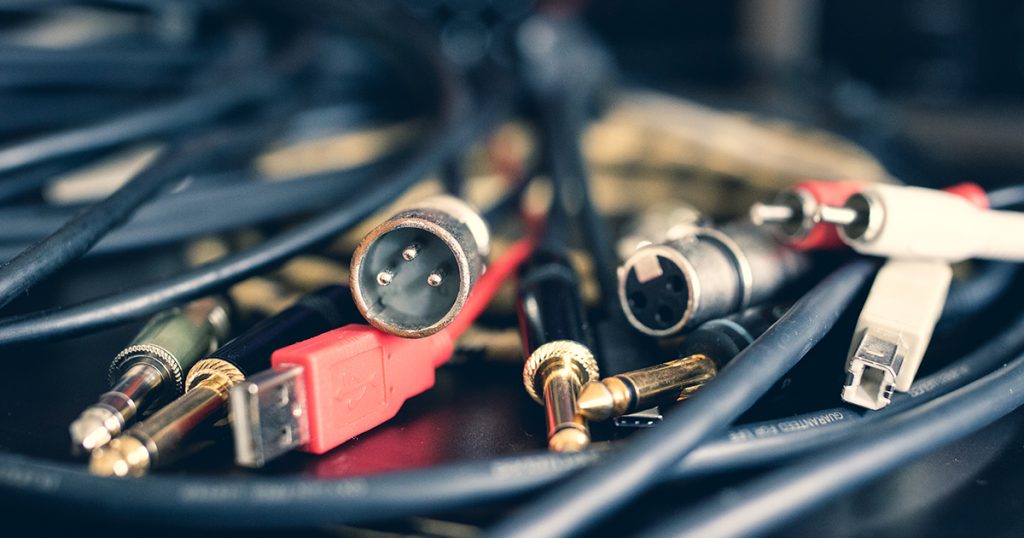
In (home) studio, there are a significant number of different cables and connectors, with names that are not necessarily explicit at first glance: jack TS, jack TRS, mono jack, stereo, XLR connector, RCA connector…
In short, it’s hard to find your way: when should you use this cable rather than that one?
Typically, when you start in a home studio, when you buy your first gear, and you need to connect your microphone to your audio interface or connect a mic preamp to your sound card… well, it can sometimes be complicated to know which cable to buy.
The same goes if you need audio cables for your guitar or your audiophile setup: it’s easy to make a mistake and buy the wrong cable.
Therefore, I offer you this detailed guide to address this problem: after reading it, you will have all the knowledge to choose your next cables, audio or not, for your studio, your instruments, or your audio equipment of any kind without hesitation.
Here are the topics we will cover:
- Analog cables vs. digital cables: what’s the difference?
- Analog cables
- MIDI cables
- Digital cables
- Computer connections
Analog cables vs. digital cables: what’s the difference?
Before we dive into the details of the connectors, let’s take a moment to remember that there are two main types of audio signals: analog signals and digital signals.
Analog signals take the form of a continuous curve, with voltages varying between positive and negative values.
Digital signals, on the other hand, take the form of a series of 1s and 0s (bits), which are encoded as rapid voltage transitions.
Thus, we get a curve that resembles a square wave.

So, these are two options for transporting an audio signal.
For analog signals, they can be directly exploited by an amplifier, for example, to be played by a speaker; for digital signals, they must first be converted back to an analog signal before they can be amplified.
But that’s a topic in itself that goes beyond the scope of our article on audio cables. 😀
Analog cables
Let’s start by looking at analog cables, which are probably the most complex to select in a home studio.
At least, those that generate the most confusion.
Asymmetrical cables vs. Symmetrical cables
Now that you know the difference between analog cables and digital cables, it is also essential to understand the difference between unbalanced cables and balanced cables.
Yes, sorry, I will make you wait a little longer before we discuss everything related to audio connections.
But this notion of unbalanced vs. balanced is essential to properly understand what follows.
Basically, to transmit an analog audio signal through a cable, there are two main ways to do it: via an unbalanced cable or via a balanced cable.
Unbalanced cables
Unbalanced cables consist of two conductors:
- a central wire used to carry the audio signal;
- a metal braid surrounding the central wire, which corresponds to the ground. It serves as a return path for the audio signal, but also protects the central wire, to some extent, from electromagnetic interference (radio waves, lighting radiation…).

It works quite well, but the cable inevitably acts as an antenna. This means that in all cases, it will tend to pick up noise: the longer the cable, the more noise you will have in your signal.
Generally, it is advised to avoid exceeding 4 or 5 meters for unbalanced cables — especially for weak signals like that of a microphone or an electric guitar.
Balanced cables
Balanced cables aim precisely to reduce the noise problems mentioned just before.
In a balanced cable, you have three conductors:
- a first central wire used to carry the audio signal;
- a second central wire, which carries the same audio signal but with its phase inverted (180° phase shift);
- a metal braid surrounding the two central wires, which corresponds to the ground. Again, this braid serves to protect against electromagnetic interference.
These are generally cables that we will use to transmit line-level signals.

So what is the difference with unbalanced cables?
Well, you might guess that the presence of two central wires instead of one, with one of the wires carrying an audio signal out of phase with respect to the first, is not a coincidence.
If we were to add the signal from these two wires, we would of course get a null signal, since they are opposite.
However, when the audio signal travels through the cable between the source device and the target device, it picks up noise (electromagnetic interference) in the same way as the unbalanced cable.
The key point to understand is that the noise picked up by each of the central wires of the cable will be exactly the same.
The technique then consists, at the target device, of inverting the phase of the second wire again. By doing so:
- the two audio signals carried by the wires are once again in phase
- but the phase of the background noise is now inverted in wire 2 compared to wire 1.
When we finally add the signals from the two wires, this therefore has a double impact:
- the audio signal is now twice as strong;
- the background noise cancels out.
In other words, TRS cables help minimize interference and background noise from audio cables.
TS and TRS jack cables
We saw in the previous section that unbalanced and balanced cables differ by the number of conductors/wires: unbalanced cables have 2 while balanced cables have 3.
To manage this situation, we will therefore find different connectors and connections — including the famous TS and TRS jacks.
Let’s start with jack cables.
What is the exact difference between TS jack and TRS jack?
At first glance, jack connectors may seem like a real puzzle, but in reality, it’s quite simple.
To understand the difference between TS and TRS jacks, let’s take a look at the following annotated image:

As you can see, TS jacks (Tip – Sleeve) have two segments separated by a black plastic insulating band — so two contact points.
TRS jacks (Tip – Ring – Sleeve), on the other hand, have three — so three contact points.
So if you were wondering “what is a TRS jack cable”, well, it’s simply a TS cable with an additional contact point.
As a result, TS and TRS jacks will serve two very different purposes:
- TS jacks will always be used to transmit an unbalanced signal, as they can only be connected to two-wire cables. The signal will therefore always be mono.
- TRS jacks can:
- either be used to transmit a balanced mono signal, as they can be connected to three-wire cables;
- or be used to transmit a stereo signal, but it will then be unbalanced. Typically, this is often the case for cables used on audio headphones.
And that’s it 🙂 !
👉 To get into detail and see my cable recommendations, here is a detailed article on jack cables
What jack cable for my guitar?
If you need cables for your guitar (electric or electro-acoustic), you should buy a TS jack cable.
Indeed, the connectors on guitars are always unbalanced, with 6.35mm jacks.
(We will talk about dimensions a bit later, but basically, 6.35mm is the standard size. The “big jacks”, if you will.)

For example, for a good guitar cable on a budget, you can buy a Cordial TS cable like the one in the photo next to it.
👉 Click to compare prices: Thomann Woodbrass Amazon
Mono or stereo jack cable?
If you have already looked a bit on the main shops to buy audio wiring for your home studio or your instruments (or your audio gear, whatever it may be), you have probably seen the term “stereo jack cable”.
In contrast, therefore, to “mono” jack cables.
Well, let me reassure you: in relation to what we just explained, “stereo jack cables” and “TRS jack cables” are strictly similar.
Only the name changes.
This adds complexity for the beginner looking for a cable, but not connection complexity: if you need to transmit a stereo signal in a cable, you will necessarily need to take a TRS cable and the signal will then be unbalanced.
The different sizes of jacks
Jack cables come in several sizes, each having very specific uses.

The most common version in home studios is the 6.35 mm (or ¼ inch) jack, which is found on instruments like electric guitars, keyboards, and studio headphones. It is the standard in professional and semi-professional environments for balanced or unbalanced audio connections.
Next, there is the 3.5 mm jack, often referred to as “mini-jack.” This is the one you see everywhere on smartphones (when they still have one) or laptops. It is often used for consumer audio headphones or to connect small devices like portable recorders.
In home studios, it is sometimes used with adapters like this one, but be careful: they can weaken the connection or cause interference if the quality is average.
Finally, there is the 2.5 mm jack, which is rarer and mainly used on certain specific devices like headset kits or telecommunication equipment. For home studio use, there is little interest in focusing on it unless you are working with very particular equipment.
And of course, all these cables can exist in the form of TS, TRS, or TRRS jack cables.
TRRS Jack Cables
Even though in the world of studios and audiophiles it is uncommon, it is interesting to note that there are also TRRS (Tip-Ring-Ring-Sleeve) cables that add an additional contact point compared to standard TRS cables.
This allows them to carry not only a stereo signal and the ground, but also a fourth channel dedicated to additional features.
These cables are mainly found in the consumer domain, particularly for audio headphones with built-in microphones (like smartphone earbuds) or for audio/video connections on certain devices. The fourth contact often serves to transmit the microphone signal or to manage controls (play/pause, volume, etc.).
However, in home studios or whenever we talk about somewhat professional audio equipment, the use of TRRS cables is quite rare.
Most audio interfaces and recording equipment use TRS or XLR connections to ensure optimal quality and maximum compatibility. TRRS cables are generally not supported by standard inputs and sometimes require specific adapters to function correctly.
If you need TRRS mini-jacks, I recommend by default to check out the cables from Ugreen, which are of sufficient quality for everyday use.
👉 Click here to see the price on: Amazon
XLR Cables
Now come the famous XLR cables that are found everywhere in studios and home studios.

What is an XLR cable
XLR cables are named so because of their characteristic three-pin connectors, which you can see in the photo above.
Typically, this XLR connection is often used for studio microphones, but it is also used on a number of hardware devices (patchbays, compressors, equalizers, etc.).
It is also the type of cable that is often used to connect active monitoring speakers to an audio interface.
Since XLR connectors have three pins, this means they can be connected to three-wire cables.
XLR cables are therefore always balanced.
If you are looking for an affordable XLR cable, I particularly recommend looking at the Cordial brand, which offers good value for money.
👉 Click here to compare the price: Thomann Woodbrass Amazon
The difference between XLR and TRS cables
In principle, XLR cables are strictly identical to TRS jack cables — except that the XLR connection is potentially a bit sturdier / holds a bit better once plugged in.
But in terms of use or operating principle, from an electrical point of view, there is no difference.
That’s why we sometimes find cables that have an XLR connector on one end and a TRS jack on the other: they are strictly equal.
In absolute terms, one could imagine using XLR cables to pass an unbalanced stereo signal, but in practice this is never the case: these cables are always used for balanced mono signals.
👉 Click here to see my detailed recommendations for XLR cables
RCA cables
Finally, there is the subject of RCA connectors — also known as cinch.

This is more of a consumer connection, but it can sometimes be found in (home) studios:
- on DJ turntables;
- on phono amplifiers (if, for example, you are doing sampling…);
- at the back of monitoring speakers to provide an unbalanced input option;
- …
Since we are dealing with a two-pin connection here, this means that RCA cables will always be unbalanced analog cables.
Or almost, since RCA connectors are also used for digital applications that we will discuss in a moment.
By default, unless you need something really higher-end, you can look towards cables from the Cordial brand that do the job perfectly.
👉 Compare the price of Cordial RCA cables: Thomann Amazon Woodbrass
A little summary table…
To summarize everything we’ve just said about analog connections in home studios, here’s a little synthesis table 😉 :
| Cable | Mono Unbalanced | Mono Balanced | Stereo Unbalanced |
|---|---|---|---|
| Jack TS | X | – | – |
| Jack TRS | – | X | X |
| XLR | – | X | – |
| RCA (cinch) | X | – | – |
Analog Cable Buying Guide
Normally, with the few paragraphs above, you should already have all the necessary information to define the type of cable you need.
That said, you will of course also need to make a choice regarding the brand of the cable.
And here, again, a complex problem: which brand to buy? what quality should you choose? how much should you spend?
I have already mentioned a few brands and models of cables, but let’s go into a bit more detail.
Objectively, there’s no need to spend a fortune on your cables — but at the same time, you should avoid low-end cables with an uncertain lifespan.
Yes, there are cables for €1 on Aliexpress, but having tested one day, the jack was not the right size.
Not to mention the finishes.
See for example the difference after a few years between a quality adapter (on the left, still with its gold plating) and an Aliexpress adapter (on the right, the plating has disappeared):

If your budget is really limited, I recommend opting for “entry-level” cables but of good quality, such as those from Cordial. The quality/price ratio is very good.
If you want to invest a bit more, it’s worth switching to brands like Klotz or Sommer Cable. I use a mix of both, and it works without any issues.
Here are some links to see the prices associated with these different brands:
| Cable | Cordial | Sommer Cable | Klotz |
|---|---|---|---|
| XLR-XLR | Thomann Woodbrass Amazon | Thomann Amazon | Woodbrass Amazon |
| Jack TS – TS | Thomann Woodbrass Amazon | Thomann Amazon | Woodbrass Amazon |
| Jack TRS – TRS | Thomann Woodbrass Amazon | Thomann | Woodbrass Amazon |
👉 That said, if you are specifically looking for a jack cable, I also recommend reading in detail these recommendations regarding jack cables.
👉 And if you are rather looking for an XLR cable, click here to see my advice.
Finally, you can even make your own cables — which can be economical either in the long run or if you have an immediate need for several cables. I will write a short article on the subject at some point… 😉
MIDI Cables
MIDI connections are very common in home studios, especially on audio interfaces and synthesizers.
However, the term “MIDI connection” is, I find, a misuse of language, since in reality the standard connection is a 5-pin DIN connection.
The word “MIDI” actually mainly refers to the communication protocol for everything related to synthesizers, sequencers, or controllers… in short, for most hardware that generates or needs to receive musical notes.
(This protocol allows sending messages such as musical notes, but also modulations, velocity controls, etc.)
Although MIDI cables seem simple at first glance, their role goes far beyond just data transmission. Since the MIDI connection is unidirectional, it is common to encounter the following terms:
- MIDI IN: to receive data (example: a MIDI controller sending information to a synthesizer).
- MIDI OUT: to send data (example: a synthesizer sending information to a sequencer).
- MIDI THRU: a particular output that exactly replicates the signal from MIDI IN, allowing multiple devices to be chained without requiring additional cables.

Note that MIDI signals allow up to 16 channels per cable. This means you can send 16 different messages simultaneously.
For example, with a MIDI controller connected to your audio interface, you can control up to 16 distinct synthesizers, each instrument playing a different melody, or use complex sequences. This ability to manage multiple channels makes MIDI particularly useful in more complex setups in professional or home studios.
Most of the time, if your setup is fixed, there is no need to invest in a very expensive MIDI cable.
Personally, most of my synthesizers are wired with Cordial cables, which do the job perfectly.
👉 Click to compare the price of Cordial MIDI cables: Thomann Amazon Woodbrass
Digital Cables
In the studio, there are of course not only analog cables or MIDI cables: we also find digital cables, whose use is increasingly spreading (I find) with technological evolution.
Generally, the purpose of these cables is to allow connecting more equipment to an audio interface or a computer while minimizing the number of cables needed.
ADAT Connectivity (Toslink)

ADAT connectivity is undoubtedly the most common digital connectivity.
It is sometimes encountered under its full name: ADAT Optical Interface or ADAT Lightpipe.
However, I say connectivity but ADAT is rather a protocol that allows the transfer of audio data between equipment.
Anecdote: ADAT is an invention of the brand Alesis. Indeed, ADAT stands for Alesis Digital Audio Tape.
ADAT messages are transmitted via optical cables with Toslink connectors, unidirectionally: when you purchase an audio interface or equipment with ADAT connections, make sure to check whether they are ADAT IN (inputs) or ADAT OUT (outputs).
The connectivity allows for the transport of up to 8 different channels at 24 bits/48 kHz (and only 4 channels if you increase the sampling rate to 96 kHz).
A typical use case for ADAT is the addition of preamps: suppose you have an audio interface but do not have enough preamp inputs, for example, to record a drum set.
Fortunately, it has an ADAT IN port.
To record your instrument, you just need to buy a rack of 8 preamps like a Focusrite OctoPre with a built-in digital-to-analog converter and an ADAT output. You can then connect this output to your ADAT IN input.
👉 Click here to see some quality ADAT optical cables: Thomann Woodbrass
S/PDIF Connectivity
S/PDIF is another digital connectivity invented by Sony & Philips — hence the name which stands for Sony / Philips Digital InterFace.
It is quite regularly found at the back of audio interfaces; however, I find it ultimately quite useless, although it does allow for easy pairing of certain preamps with built-in converters like the Audient MiCo.
The connector used to pass an S/PDIF signal is generally the RCA (cinch) connector, which can easily lead to confusion. However, here, it is indeed a digital connectivity that has nothing to do with the analog connectivity we discussed earlier.
Finally, S/PDIF connectivity is similar in principle to ADAT, in that the signal is unidirectional and digital.
However, they are quite distinct connections; moreover, S/PDIF can only carry two channels of signal.
Note: in some cases, Toslink optical connectors may be used to pass S/PDIF signals.
AES/EBU Connectivity
AES/EBU connectivity is very similar to S/PDIF as it also allows for the transmission of two audio data signals (channels) at the same time.
Although it is possible to use a 75-ohm BNC cable, AES/EBU most often employs a balanced XLR cable.
Yes, these are indeed the same XLR connectors as for the analog XLR cables mentioned above. However, the cable itself is generally slightly different and adheres to stricter impedance standards.
BNC Connectivity
BNC is a coaxial connectivity known as “75 ohms” that carries a Word Clock type signal in studio applications — that is to say, a clock signal used to synchronize different digital devices (like two converters).
This helps maximize the quality of what is recorded.
👉 Click here to see some quality BNC cables: Thomann Woodbrass Amazon

Computer connections
Of course, as soon as you work in a studio and in a context that is not 100% analog (in other words, as soon as you record or mix on a computer), you will find different connections that I will call “computer” because they concern, precisely, the link between your equipment and your computer.
USB connectivity
USB cables are clearly the most common: most audio interfaces are indeed based on this technology.
In the context of home studio devices, there are three main types of USB connectors:
- USB-A
- USB-B
- USB-C
These are easily recognizable, so there is not really a risk of getting it wrong:

Moreover, since the USB standard evolves regularly, there are several versions of it: USB 2.0, USB 3.0, USB 3.1, USB 3.2, etc.
This is therefore information to take into account when connecting your equipment.
Fortunately, compatibility between versions is ensured — the only real difference being the amount of data that can be transmitted per second through the cable.
But if your audio interface is in USB 3, it will be ideal to connect it to a USB 3 port on your computer.
Note: do not confuse the version of the USB standard with the type of connector. Thus, a USB-C connector can be used for both USB 2 and USB 3 equipment.
Thunderbolt connectivity

Thunderbolt is, in a way, an alternative to USB connectivity, generally considered faster and thus allowing to reduce the latency of audio interfaces.
As with USB connectivity, you will find different versions of the technology, as well as different connectors.
However, this time, it’s a bit simpler:
- either your audio interface is in Thunderbolt 1 or 2, and in this case, you will need a Thunderbolt cable with Mini DisplayPort connectors;
- or your audio interface is in Thunderbolt 3, and in this case, you will need a Thunderbolt cable with USB-C connectors.
However, be careful: “classic” USB-C cables may not necessarily be usable for Thunderbolt connectivity, even if the connector is the same.
FireWire connectivity
Finally, on some models of audio interfaces, you will find Firewire connectors.
These can be of two types: 400 or 800. So be careful when buying a cable of this type to choose the right connector.
However, it should be noted that FireWire is clearly losing momentum today. So it is quite likely that the connector itself will soon disappear from our home studios, with a few rare exceptions.
In conclusion
You have seen it: for everything related to digital cables and computer connectors, it’s quite simple.
But when it comes to analog audio wiring, it’s a bit more complicated and you need to be careful not to make a mistake.
Fortunately, with this article, you should normally have all the information to choose your cables well! 🙂
If you still have questions, feel free to ask them in the comments.
👉 Keep reading by checking my home studio equipment guide